
The following features should be activated in the org before the package installation:
- State and Country/Territory Picklists
- Quotes
- Orders
- Custom Address Fields
If everything is already activated, this step could be skipped.
Step-by-Step Instructions #
If proceeding is not yet intended, this section provides step-by-step guidance for enabling the necessary features or verifying whether they are already activated.
State and Country/Territory Picklists #
Steps to Enable State and Country/Territory Picklists:
- Go to Setup.
- Search for State and Country/Territory Picklists in the Quick Find box.
- Click on State and Country/Territory Picklists.
- Check if the feature is already activated:
- If the Deactivate button at the bottom is shown, no further action is required.
- Otherwise, follow the steps outlined on the page to enable the feature.
Additional Info: Refer to the official Salesforce guide for detailed instructions.
Quotes #
Steps to Enable the Quote feature:
- Go to Setup.
- Search for Quotes in the Quick Find box.
- Click on Quote Settings.
- Check if the feature is already active:
- If it’s active, no further action is needed.
- Otherwise, check the box to Enable Quotes.
- Click Save.
Additional Info: Refer to the Salesforce guide for detailed instructions.
Orders #
Steps to Enable the Orders feature:
- Go to Setup.
- Search for Order Settings in the Quick Find box.
- Click on Order Settings.
- Check the box to Enable Orders.
- Optionally, check Enable Reduction Orders and Enable Negative Quantity Orders if needed, though these are not required for Finblick.
- Click Save.
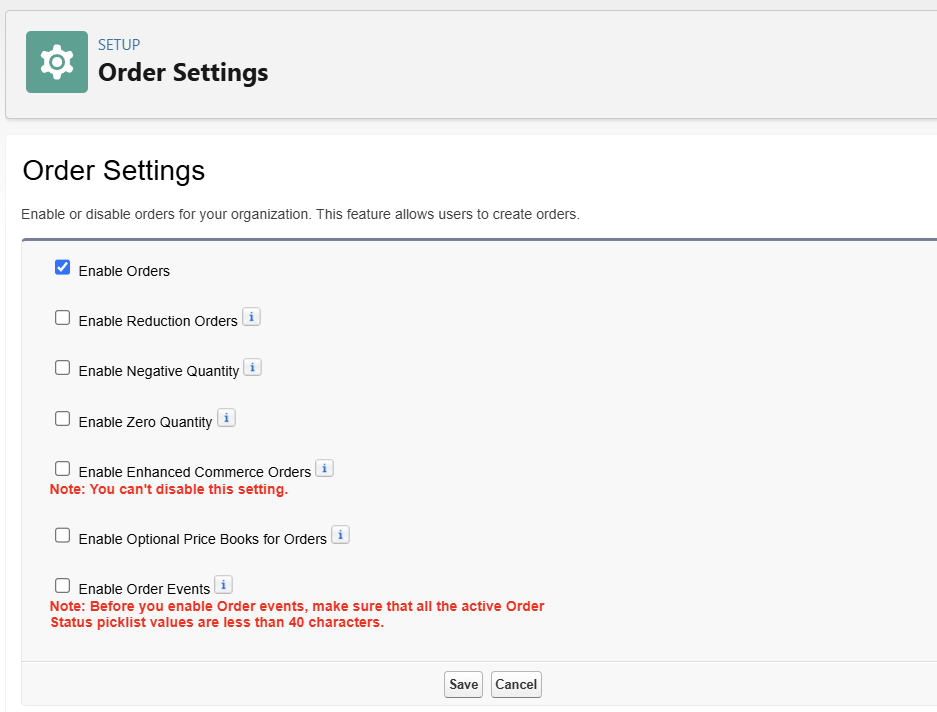
Additional Info: Refer to the Salesforce guide for detailed instructions.
Custom Address Fields #
Steps to Enable the Custom Address Fields feature:
- Go to Setup.
- Search for User Interface in the Quick Find box.
- Click on User Interface.
- Check the box for Use Custom Address Fields if it’s not already enabled.
- Click Save.

Additional Info: Refer to the Salesforce guide for detailed instructions.


