
This article describes important considerations when working with the Multiple Legal Entities feature in Finblick. These topics are especially relevant when configuring Number Sequences and when working with users who do not have Finblick licenses.
Separate Records per Legal Entity #
When working with Multiple Legal Entities, each Legal Entity should operate on its own dedicated set of records. This applies in particular to financially relevant objects such as Accounts, but also affects downstream records like Opportunities, Quotes, Orders, Invoices, and Credit Notes.
From an accounting and compliance perspective, a Legal Entity represents an independent economic unit. Financial documents, number sequences, tax treatment, reporting, and exports (for example DATEV) are evaluated strictly per Legal Entity. Mixing transactions of different Legal Entities on the same business record would break this separation and lead to incorrect reporting.
Example: Separate Accounts for each Legal Entity #
If a customer does business with more than one Legal Entity, separate Account records must be created, one per Legal Entity.
Example scenario:
- Legal Entity LE-A sells services to a customer.
- Legal Entity LE-B also sells services to the same customer.
In this case:
- One Account record is created and assigned to LE-A.
- A second Account record is created and assigned to LE-B.
Although both records may represent the same real-world company, they are treated as financially independent customers within the system.
Why This Is Required #
Using separate records per Legal Entity ensures that:
- Financial documents are generated with the correct Legal Entity data.
- Number Sequences remain unique and consistent.
- Tax rules and accounting logic are applied correctly.
- DATEV Exports remain compliant.
This approach reflects standard accounting practice, where a customer relationship is always evaluated in the context of the selling Legal Entity, not globally.
Recommendation #
It is strongly recommended to establish a clear data model strategy early on:
- One Legal Entity per financial record.
- One Account per Legal Entity–customer relationship.
- No shared financial records across Legal Entities.
This structure provides long-term stability, avoids validation errors, and ensures that the Multiple Legal Entities feature can be used reliably and in line with financial best practices.
Post-Activation Configuration for Legal Entities #
Keep in mind that Legal Entities for each document type (Quotes, Orders, Invoices, Credit Notes), Account and DATEV Export must either be assigned manually or determined through an automation process.
To ensure proper functionality after activating the Multiple Legal Entities feature, additional configuration of the object layouts is required.
The Legal Entity field must be added to the relevant object layouts, following the same procedure described in the article “Configure UI and Generate the First Document”.
Example: Adding the Legal Entity field to the DATEV Export record page
(The same configuration should be applied to Account, Quote, Order, Invoice, and Credit Note objects.)
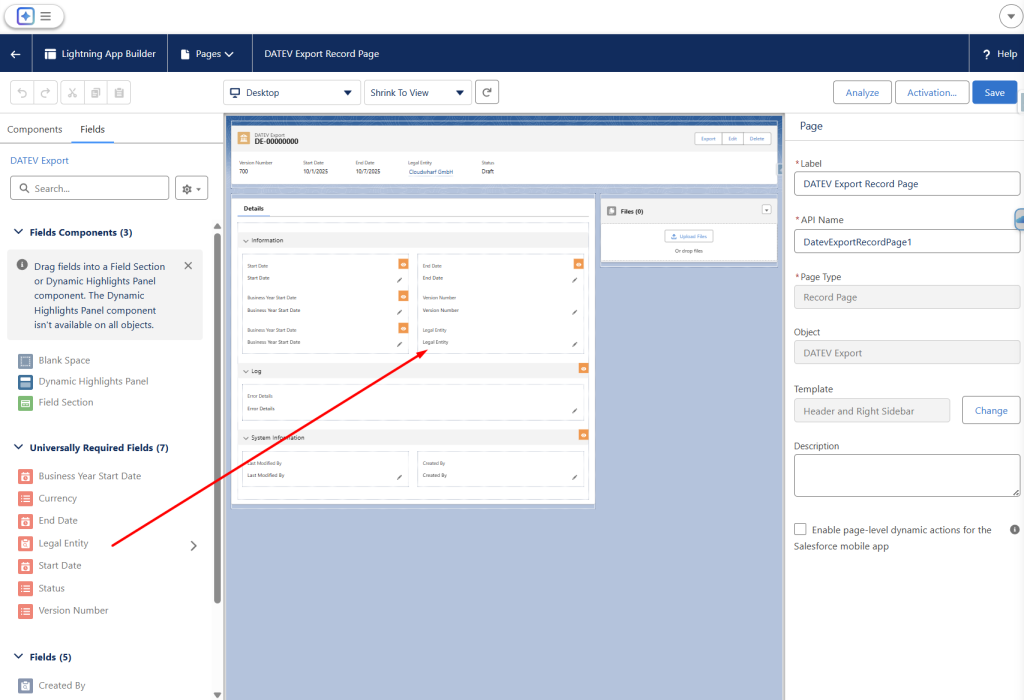
After activating the Multiple Legal Entities feature, the Legal Entity field must contain the same value on both of the following records:
- Account
- Document record (Quote, Order, Invoice, or Credit Note)
If the values do not match, a validation error message will appear when attempting to generate the file.
Number Sequence Format per Legal Entity #
When Multiple Legal Entities are enabled, Number Sequences must use different formats for each Legal Entity.
If the same Number Sequence format is used across multiple Legal Entities, Finblick may identify generated document numbers (such as Quotes, Order Confirmations, Invoices, or Credit Notes) as duplicates, even if the documents belong to different Legal Entities. This can lead to validation errors during document generation.
To avoid this issue, it is strongly recommended that unique prefixes are added to number sequence formats for each Legal Entity. These prefixes can consist of letters, numbers, or a combination of both.
Example:
- LE1-INV-[NUMBER]{8} or INV-LE1[NUMBER]{8}
- LE2-INV-[NUMBER]{8} or INV-LE2[NUMBER]{8}
Using distinct prefixes ensures that document numbers remain unique across all Legal Entities and prevents conflicts during document generation.
The same principle applies to Customer Numbers and Supplier Numbers.
When Multiple Legal Entities are enabled, Customer Numbers and Supplier Numbers must also be unique per Legal Entity. Reusing the same Customer Number or Supplier Number across different Legal Entities can lead to ambiguities in financial documents and DATEV exports.
To ensure correct financial attribution and consistent downstream processing, it is recommended to:
- Use Legal Entity–specific prefixes for Customer Numbers and Supplier Numbers.
- Ensure that numbering logic clearly distinguishes records belonging to different Legal Entities.
Applying unique formats for document numbers, Customer Numbers, and Supplier Numbers ensures clean data separation, prevents validation conflicts, and supports compliant financial reporting across all Legal Entities.
Working with Users Without Finblick Licenses #
In some Salesforce orgs, not all users have a Finblick license. Users without a Finblick license do not have access to Finblick objects, including the Legal Entity object.
When Multiple Legal Entities are enabled, this limitation can cause issues with standard Salesforce objects, because:
- The Legal Entity lookup field will not be visible to users without a Finblick license.
- Lookup fields referencing the Legal Entity object cannot be populated directly by those users.
This behavior must be considered when Legal Entity information is required early in the sales process.
Setting the Legal Entity in the Sales Process #
In many implementations, the Legal Entity needs to be defined at the very beginning of the sales cycle, typically on the Lead object.
Within Finblick, a Legal Entity lookup field is provided on the Account object as part of the Finblick application. However, standard objects such as Lead or Opportunity do not include this field by default.
For users with a Finblick license, a Legal Entity lookup field can be created on Lead and populated directly. After Lead conversion, the value can then be transferred to the Account and used throughout the sales process.
For users without a Finblick license, this approach is not possible, because the Legal Entity object and its lookup fields are not visible.
To support users without Finblick licenses, it is recommended to introduce an additional mandatory picklist field on objects such as Lead.
This picklist should:
- Contain all available Legal Entities as values.
- Be visible and editable for all users, including those without Finblick access.
- Be used to capture the Legal Entity selection at an early stage.
Users without a Finblick license populate this picklist instead of a lookup field.
Automation Considerations for Legal Entity Assignment #
To ensure consistent data across objects, automation must be implemented.
A Flow or Apex should be introduced to:
- Monitor changes to the Legal Entity picklist field.
- Automatically populate the corresponding Legal Entity lookup field when the picklist value is set.
- Ensure that the Legal Entity value is correctly transferred to downstream objects such as Account and Opportunity.
This approach allows:
- Early selection of the Legal Entity in the sales process.
- Compatibility with users who do not have Finblick licenses.
- Consistent Legal Entity assignment across all relevant objects.


